Catch what counts without losing focus. Proximate quietly surfaces what matters, right by your mouse pointer.


Not at your computer right now?
Send yourself a link for later.

Pick the most important apps on your computer for Proximate to monitor. When a monitored app sends you a notification or needs your attention, you'll see it's icon appear by your mouse pointer, and it will disappear automatically when you check on it.

Whether you're working or chilling in full-screen, it's easy to lose track of time when the clock in your menu bar also disappears. With Proximate, you can have the time and date appear right by your mouse pointer so you're always on the ball.

Set one or more timers right next to your cursor. Count down to a deadline or track time as it passes.

Based on a low-vision optical tool, the Minifier shows a live, miniature view of your entire display, so you can stay focused on one part of the screen while keeping a bird's-eye view of everything.

It's always annoying to forget you're on mute, to discover too late that your laptop isn't charging, or to miss that your Wi-Fi has dropped. Proximate shows indicators for volume, network, battery and power, Focus modes, and even print jobs.

Watch CPU, RAM, GPU, and VRAM in real time, right beside your cursor. Choose how each one is drawn, set your own colors, and use thresholds so a monitor only appears when a number actually needs your attention.

Show or hide the clock and any app icons by your mouse pointer with a keyboard shortcut.

Too many app icons appearing? Quickly clear away any visible app icons by your mouse pointer with a keyboard shortcut.

Instantly center the mouse pointer on the current display. Never lose your mouse pointer again.
Use the new full-screen Appearance Editor to quickly and easily position, resize, and customize tools around your mouse pointer.

Position app icons and the clock at any angle or distance around your mouse pointer

Independently change the size of icons and clock text
Have app icon notifications stack by your mouse pointer horizontally or vertically

Pick from 9 different ways to customize how the clock displays the time and date

Make the clock stand out more (or less!) with custom fonts and colors

Motion transparency options can make items by your mouse pointer appear or disappear whether or not your mouse pointer is moving.

Select from a digital counter in text (h:mm:ss), a progress bar, or a circle. You can even have colors change as time runs out.

Easily sync your settings across all of your screens
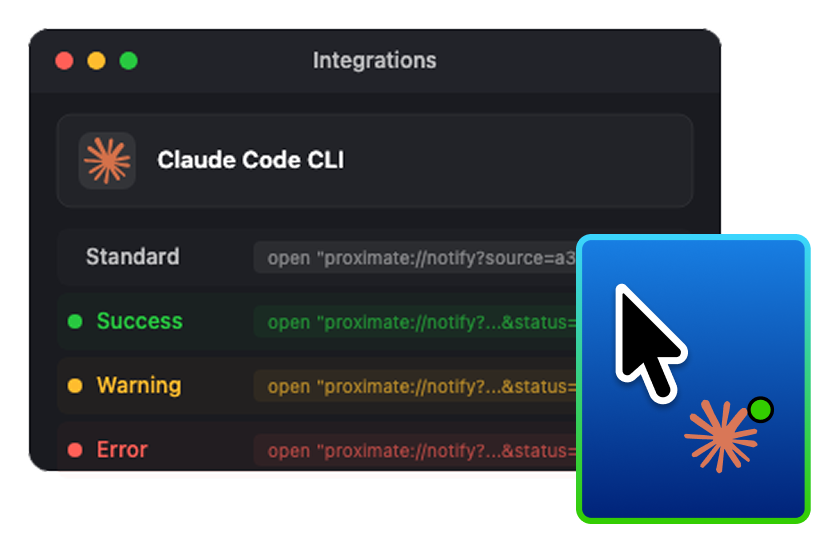
Connect builds, scripts, and automations to Proximate with a copy-and-paste URL that triggers a notification badge — optionally with color-coded status — so background work reports itself, right at your cursor.
No credit card required to begin. Only pay when your trial ends. Cancel your subscription at any time.
Need to run Proximate on more than 5 devices? Reach out to [email protected]. Commercial, educational, and government licensing programs are also available.