I missed a message from my mom. Not because I was busy. Not because my phone was on silent. The notification appeared exactly where it always does in macOS — the top-right corner of a 27-inch screen. I just didn't see it.
Over the last few years, I've experienced a lot of peripheral vision loss. This means that whatever I'm looking directly at appears fine, but just about anything outside of that is hard or impossible to perceive. The simplest way to describe what this is like is to imagine looking through a drinking glass with a clear bottom but frosted, bumpy sides. You can see fine through the clear part, but that's about it.
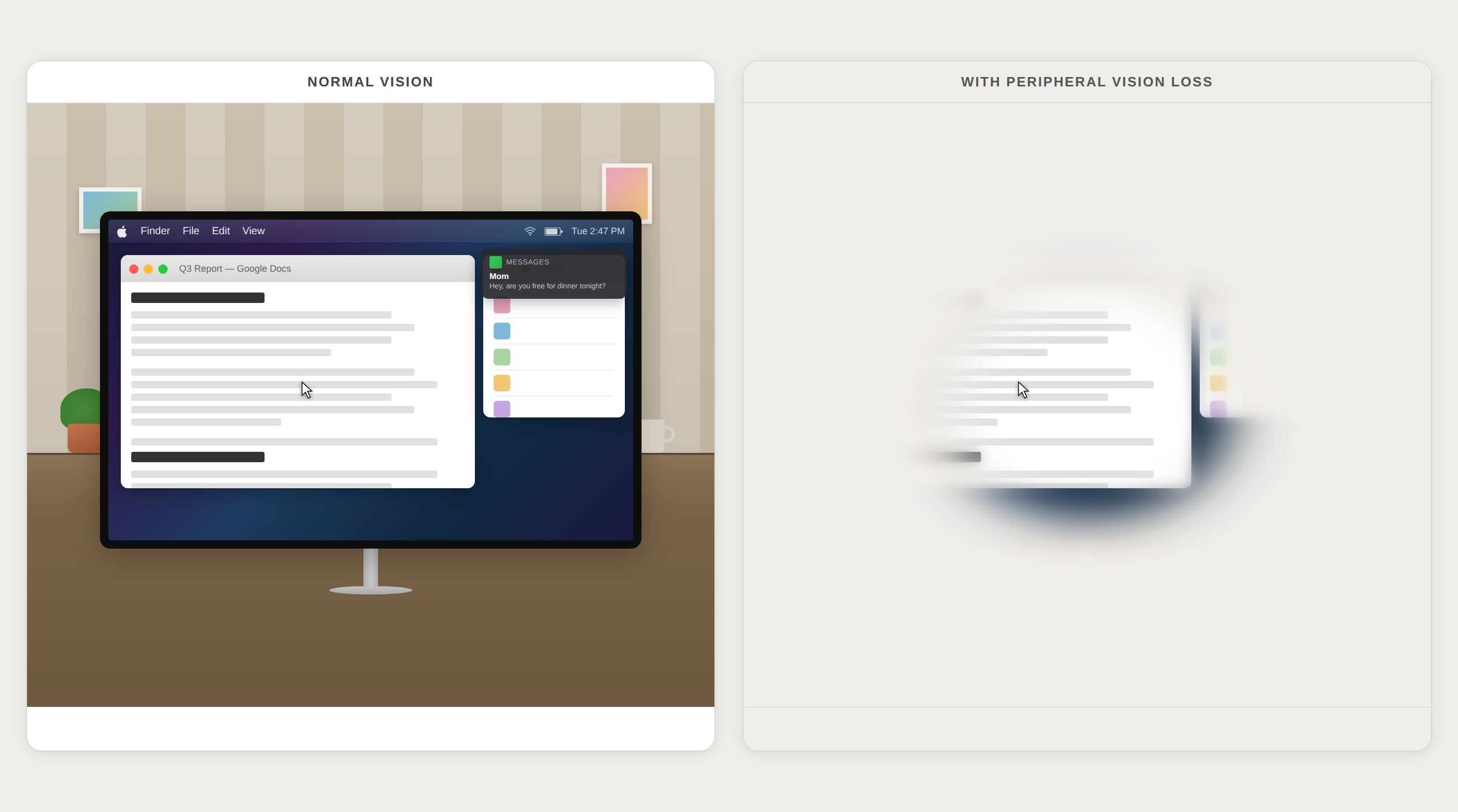
This presents an interesting problem. See, if the items on your screen are too small, you can do things like increase your default text size or adjust the resolution to make things larger. But what if you can't see what's on the edges of your screen? You can't move the things that live at the edge of your screen anywhere — except for sometimes another edge.
A Problem Nobody Talks About
When people think about “visual accessibility” in software, they often think of tools like screen readers such as JAWS or VoiceOver — immensely important tools designed for those without any usable vision. But there's a huge population of people with what's known as “low vision” who fall in between: we can see the screen, we can use a mouse, we can read text. We just can't see all of the screen all of the time.
Peripheral vision loss affects millions of people worldwide — from glaucoma (one of the leading causes) to retinitis pigmentosa, stroke, and brain injuries. And yet, almost every operating system places some of its most time-sensitive information on the edges or in the corners of its users' screens, adding to one's mental and physical workload. This isn't new, either; it's been the case for over 30 years.
The "Aha" Moment
One afternoon, I was deep in work and noticed I kept losing track of time. I'd look up and an hour had vanished. I kept missing updates in Slack. Calendar reminders would come and go without me ever seeing them. Yes, I was getting vibrations on my watch and phone — but since I wasn't seeing any notifications appear on-screen, I had mistaken those buzzes for lower-priority events that were safe to ignore until later.
After running late to more than one meeting in a week, I started getting frustrated and thought about the problem some more. I thought: What if the things I need to see came to me, instead of me going to them?
The one thing I always have to look at is my mouse pointer. It's quite literally the center of attention on-screen many times per hour. What if things like notifications and the clock just... lived there? Could that work? How could that work? I made a few sketches, found an incredible engineer, and knocked out a quick prototype.
From Accessibility Tool to Productivity Tool
Here's what surprised me: when I showed the prototype to friends — people with perfectly normal vision — they wanted it too.
It turns out that on large- or multi-monitor setups, almost everyone had a version of my problem. A notification appears in the top-right corner, you're focused on something a few thousand pixels away, and by the time you glance up, the banner is gone.
Even for my friends with just one screen, working in a browser or in a full-screen document designed for focus would create a counterintuitive situation. Many love deep focus, but don't want to fall too far down a rabbit hole, which becomes easier when there's no clock on-screen.
Proximate solves this for everyone. But it was born out of a very specific accessibility problem that, until now, lacked an elegant solution.
Accessible Technology at Sane Pricing
Proximate costs about the same per year as a fancy cup of coffee in a small city. Assistive technology is often absurdly expensive, and I didn't want cost to be a barrier for anyone who genuinely needs this tool to make the most of their computer comfortably.
What's Next
Proximate is available now with a free 14-day trial for Windows 10, Windows 11, and macOS 14.0 or later. Proximate is a universal Mac app that works with both Intel and Apple Silicon Macs.
Whether you have peripheral vision loss, or if you just work with a lot of big screens and keep missing notifications, or if you just think it's cool— give it a try. I also welcome any and all suggestions and feedback. You can share your thoughts any time here or by email at [email protected].
I built this because I needed it. I'm shipping it because I think a lot of other people do too.